How to impement Bring Your Own Device policy

How to Implement Your Own BYOD Policy

BYOD, or Bring Your Own Device, allows employees to work from and access company data from their smartphones and tablets. Many businesses have begun adopting BYOD policies as it gives their employees not only a sense of freedom but because it also saves the company money on tech costs. Telecommuting has risen in popularity with both employers and workers, and a BYOD policy offers a way to ease that transition and make the process more effective.
Although BYOD seems straightforward, there are a few integral factors that must be taken into account in its implementation; namely, security and efficiency. There’s also the matter of making the policy worthwhile to employees in the first place.

Many enterprises expand their BYOD policy to include all personal devices employees elect to use for connecting to the corporate networks. This means proper utilization—establishing clear and effective security protocols—is paramount to developing an all-encompassing solution to how these devices should be used, and how the company can ensure that device and its use are not abused or compromised.

Read more

content filters keeps employees productive

Why Content Filtering Keeps Employees Productive

Keeping employees productive means no wasted resources. It means a more efficient work place where deadlines are met. Better productivity doesn’t only benefit the CEOs and their bottom line, either; it’s also good for the employees. Feeling a sense of accomplishment and feeling productive can help foster better work ethic and a positive self-image.

Having days where we feel lazy or have gotten distracted at work can lead to feeling worse about ourselves and can even cost us our jobs. We feel good when we finish a task on time or ahead of schedule, so it makes sense to form habits at work that contribute to that general sense of accomplishment. With so many offices relying on computers, the internet can prove to be one of the largest obstacles in the way of our productivity.  This is where content filtering comes in.

Read more

mobile malware on the rise

Mobile Malware on the Rise

Some people might be surprised to find that even their mobile devices aren’t safe from malware. Malicious software is no longer confined to desktop computers and the rate of infection for mobile devices is on the rise. As mobile browsing becomes more common and users are able to do more from their smartphones and tablets, hackers have found a new tool with which to wreak havoc: mobile malware.

Kaspersky Lab, a cybersecurity company, reported that their mobile products alone detected a total of 103,072 new malicious programs in the Q1 2015.
Three times the amount they found in Q4 2014.
With cyberterrorists finding newer ways to abuse and exploit the browsing behavior of mobile users it’s important for executives and consumers alike to understand what mobile malware might look like and how they can better protect themselves from it.

Read more

windows 10 update

Avoid Headaches When Upgrading to Windows 10

The buzz surrounding Microsoft’s Windows 10 shouldn’t be anything new to those considering the newest upgrade. You’ve either been pressured by the little box on the bottom right of your screen to make the switch, or you can’t escape the office debates, but no matter how you look at it, upgrading to Windows 10 is a big deal.

Of course you could say the same about any major software or Operating System (OS) upgrade. But when it comes to your OS, you absolutely have to weigh the pros and cons before making the decision to stay or upgrade.
 
Upgrading too soon can cause frustration and downtime. Neither of which will make the lives of your coworkers or customers any easier. Computers are an integral part of your business, understanding the risks inherent in any OS upgrade is critical in mitigating problems associated with the installation.
We recommend waiting at least six months between the dates the software is released and installing it. Because that six months is almost up (January 29th being the six-month mark of its release) for Windows 10, we came up with a list of the four main talking points—and their pros and cons—to help you avoid the pain of a botched upgrade to Windows 10.

Read more

cyber attack

Missing These Opens Up Your Computer to Cyber-Attacks

google-data-lost-info

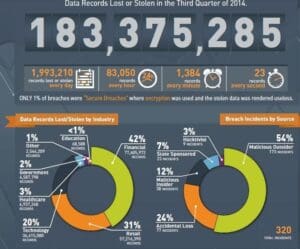
Cyber-attacks have been a plague throughout the world this past year, whose victims include government agencies, businesses, international banks, and citizens. No one seems safe from data breaches, and because so many of these cyber terrorists evade capture, the problem seems unending. Anonymous hackers breach servers to dump terabytes of sensitive information, and their victims—often collateral damage—have their social security numbers, emails, names, and more displayed, sold, or exposed for the world to see.


In the business world, a breach in your computer security can lead to lost revenue, costly downtime, or even a loss of customers when sensitive company and client information is stolen. Typical dangers range from simple data theft and damaging malware attacks to cyber mischief meant to wreak havoc on your servers, weeks or even months after the initial breach. The most startling aspect of these dangers is how easily they infiltrate computers and servers, sometimes lingering in the background as they mine for data and record user information—all without your knowledge.
Hiring professional security is common practice for companies looking to protect warehouses full of goods, so why shouldn’t businesses extend the same protection to their valuable data? Securing your networks against cyber threats isn’t just about safeguarding information—it’s about assuring others that your company won’t experience sudden downtime or a halt in productivity due to a breach.
Below are four must-have factors if you want to dodge the next cyber-attack.

Read more

backup tape drive

Top 5 Worst High-Tech Habits to Break in 2016

Admit it – you have some bad habits when it comes to maintaining the security and health of the high-tech tools your business depends on everyday. Since it’s a fresh new year, we thought this would be a great time to point out some of the most popular bad habits most businesses should be working on in 2016.

Read more

smartphone password

10 Smartphone Security Tips

For better or worse we are all practically “married” to our phones these days. Our phones go everywhere we go and have access to our most private conversations as well as our most precious memories. But as useful as our phones are, they can also make us vulnerable to attacks by thieves and cyber-criminals determined to access our private information for personal gain.
So how can you use these smartphone security tips and avoid being manipulated or attacked by cyber-criminals? Here are some smart tips to keep your smartphone safe.

Read more

Vacation Alert!

What You and Employees Should Never Do On Vacation

You’re off to your favorite vacation spot, raring to get your well-deserved break underway when you suddenly remember the urgent email you forgot to send before leaving the office. The beachfront diner has free Wi-Fi so you figure, “Why not?” …

Read more

6 ways to take control of your email for better productivity

6 Tips For Better Email Productivity

Email is often described as a blessing and a curse. On the one hand, it’s a great way to communicate with just about anyone, anywhere, at any time of day. Unfortunately, that communication works both ways, letting anyone and everyone make demands on your time and energy whenever they need to.
It’s estimated that the average employee spends two hours every day handling email. That’s more than a whole day every week! With so many messages coming in, it can be hard to prioritize other work on your plate and still get everything done.
Are you spending too much time on your email? Here are some great tips to improve your email productivity and peace of mind.

Read more

Security fail

3 Things to Avoid When Choosing an IT Provider

When talking with business owners, we’ve found time and again that many simply don’t pay much attention to their network. For many small businesses, it takes a little blip (or worse, a major catastrophe) before they realize that their network had been neglected for far too long. In the business world, the old adage “an ounce of prevention is worth a pound of cure” rings true, perhaps most especially on the IT side of things.
A haphazard or an uninformed approach to dealing with network issues ensures a few things.

  • Time will be lost; and as a result, money will be lost.
  • Network issues will persist even after the last fire is put out.
  • Instability will inevitably lead to a network disaster at some point.


However, most small businesses, and a good deal of medium-sized ones, lack the resources to manage their network with an experienced staff of full-time IT experts. The solution is to choose an IT provider to perform regular network maintenance. This introduces a really interesting (and unfortunate) catch-22 to addressing network concerns: hiring the wrong IT vendor can be nearly as disastrous as doing nothing at all. According to The Digest, some of the most important things to look for in a vendor include trustworthiness, reliability, quality service, and quality customer care. I couldn’t agree more. So what are the most important things to avoid?
I’ve written extensively about this in the past, but for the sake of brevity, here are some of the most important things to steer clear of when choosing an IT professional to service your network.

Read more