Last year was a year filled with security gaffes, data breaches, and hacks—many of which were felt country and even nationwide. Well-known organizations such as Yahoo, the NSA, and the IRS each had to deal with their own security breaches that found millions of user accounts compromised or exposed to malicious third parties. Everything from login details to personally identifiable information (PII) was released or obtained by hackers in 2016; but the attacks didn’t stop with just looted data.
Larger attacks occurred during Q3 and Q4, seeming to serve only a single purpose: disruption. There were also breaches revealed in 2016 that actually occurred years prior (much to the public’s dismay), which indicates that not only were many of these companies not capable of detecting the breach, but that they also most likely didn’t have any kind of recovery plan in place to handle the aftermath of being compromised.
While ‘blunder’ might seem like a harsh word for victims of a hack, the majority of companies could have done a lot more to mitigate the damage of their respective breaches. A noticeable percentage of the affected groups also didn’t immediately come forward about the hacks, which also constitutes a blunder, albeit a legal and PR related one.
The following summaries highlight five of the most prolific IT blunders to go down in 2016.
Benefits of an Efficient Remote Office
More than a mere convenience, telecommuting—working from a home or other remote office—provides employees and employers with some fairly impressive benefits. It hasn’t always been easy allowing employees to work remotely due to technology constraints and an inability to monitor the success of the stay-at-home worker. However, advances in both hardware and software are giving businesses the opportunity to push the limits of efficiency and make remote offices as productive, if not more so, than the actual office.
How to Properly Vet Your IT Consultant
A skilled and knowledgeable IT consultant can do wonders for your business, regardless of whether you’re a small business or a larger enterprise. Unfortunately, the reverse is true for IT consultants who are only interested in turning a profit. If their priorities don’t align with yours or they can’t handle your company’s needs, they can cause significant damage to your data infrastructure and your wallet.
The first thing you need to do is determine whether you need an in-house IT team/consultant or if hiring a third party out-of-house will satisfy your needs. In many cases, you may only need out-of-house assistance, which is fine; but the caveat with hiring consultants is that you should always apply the same vetting process to them as you would for full-time hires. An IT consultant can and likely will play a crucial part in ensuring the integrity of your network, helping you maintain backups, and providing proactive maintenance for your computers.
Your approach to hiring a consultant—and vetting them—is a multistep process that begins with understanding what you need to fill that role in the first place.
6 Tactics to Combat High-Level IT Security Threats
The number of cyber-attacks and security threats across the country and throughout the globe has gone up – but there’s an even more critical problem businesses should worry about. The complexity and threat-level of those security breaches have increased, becoming more sophisticated. It’s increasingly more common for hackers to target larger companies—oftentimes, many at once. Today’s malware tends to have many different attack vectors compared to malware five or ten years ago. This means IT security is even more integral now to the overall health and integrity of your company’s data infrastructure.
One of the most recent cyberattacks to make the headlines sent ripples out across the world as Internet usage flickered out for many large businesses and popular online services, such as Netflix, Twitter, and the Financial Times. The attack on the New Hampshire-based Internet performance management company, Dyn, was carried out as a distributed denial-of-service (DDoS) attack that came in waves. The result was literally hundreds of thousands of devices around the world infected with malware.
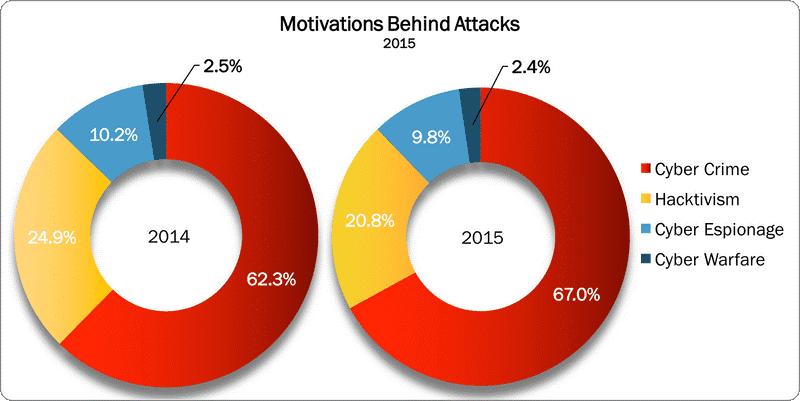
Hackers are becoming emboldened, and as activity from hacktivist groups and both cyber warfare and espionage remain somewhat steady, the world of IT security has to rise to the challenge of protecting and preventing future attacks. If the DDoS on Dyne was any indication of the scope or power of hackers out there, then companies most certainly need to reevaluate their level of IT security to ensure they have something capable of handling high-level security threats such as these.
Insider Threat Rises for Data Breaches
Data breaches have been a challenge to many businesses over the past twenty years. Cyber criminals have held files for ransom, leaked personally identifiable information (PII) to third parties, and turned millions of dollars’ worth of hardware useless. The threat of being exposed to hackers has always been a fear in the minds of computer users; however, there’s a threat as insidious lurking somewhere much closer to home.
As computing moves toward cloud-based operations and accessibility improves, employees have earned a spot on the list of threats to your company’s network.
In a previous post, we discussed the consequences of unsafe browsing while at work, but the threat posed by insiders isn’t always accidental or due to negligence. Recently terminated employees or those from the past with a grudge could spell trouble for companies if the proper measures aren’t taken.
How to Lower Your IT Costs
In the continued push to reduce overspending, increase workplace efficiency, and develop a fiscally sound work model, companies often neglect working toward lowering their IT costs. Whether your business has an in-house IT department or you outsource your IT work to another company, there are precautions you can take to avoid overpaying and being sold services you can’t benefit from.
One of the most valuable pieces of advice for companies shopping for IT services or attempting to make the most out of their internal IT teams without breaking the bank is to favor regular maintenance and proactive monitoring versus waiting to fix a problem when it occurs.
How to Protect Your E-commerce Website from Hackers and Fraud
The customer journey is a long but rewarding process, so when your e-commerce website prospects finally become customers and reach your checkout page, you want to make sure things go smoothly. You’ve done a lot to get your visitors to the checkout page, from providing high-resolution images and accurate product descriptions to a responsive design and smooth customer experience, but there’s one critical conversion element every e-commerce site needs.
Security. Specifically, customer security.
Most online stores require the same kind of information, all of which fall under either the personal or financial category. This data includes things like credit card numbers, full names, physical mailing addresses, email addresses, and more. The information a customer is required to provide to conclude an online transaction can be devastating if lost, which is what has happened to many online retail stores who have had their security breached by malware and hackers.
According to the Global Fraud Attack Index for 2016 Q2, “there were 27 attacks for every 1,000 transactions conducted in 2015 Q4, which is 11% higher than reported in 2015 Q3 and a 215% increase from 2015 Q1.” Between Q4 of 2105 and Q1 of 2016, the attack rate was higher than 4X for digital goods and doubled for luxury goods.
Whether or not customer information has been stolen or simply lost, your security and recovery plan should be able to address malicious hackers and fraud. Providing top-notch security for your e-commerce site is the best way to give your customers peace of mind, retain their business, and grow yourself as a respected, trustworthy online store.
Proactive security is necessary for the prolonged protection of your website and your customer transactions. We’ve detailed five actionable tips below to securing your site against fraud and hackers.
HummingBad Malware Infects Over 10-Million Android Devices
More than 10 million Android phones have been infected with an annoying little piece of malware called HummingBad.
This malware looks to exploit a device’s data by stealing and selling it. While its tactics are fairly run-of-the-mill for malware—drive-by-download, data theft, etc.—HummingBad goes a step further by attempting to root itself.
Gaining “root access” to a device allows malicious users to gain administrative-level control capable of overriding any Android subsystems. Hackers exploit this mode of infection to cause the most damage, and to make their malware difficult to remove. Once HummingBad has rooted itself, it can force the user to click on ads and download apps, but there’s a little more to this malware than that.
Top 10 Security Risks Faced by Companies Adopting Cloud Computing
The cloud has been a miracle to many businesses as they merge or migrate their data to the off-site storage service. See, the beauty of the cloud is all about its accessibility. Companies can manage or access data from anywhere they are, putting key information at their fingertips without a trip to the office.
Though we previously covered some of the benefits of migrating to the cloud, it’s become apparent that some companies are making that switch with only half the facts. Here’s a look at the top ten security risks that comes with migrating to the cloud.
How Outdated IT Assets Can Lead to Security Problems
Most of us know the value of keeping our software updated. This includes having the latest virus definitions installed and our operating systems and programs patched against the latest bugs. It’s really just standard practice to update these things.
Why?
It keeps our computers and networks running smoothly while ensuring any security vulnerabilities are fixed before someone can take advantage of them. If you don’t update your software, those weak points in your network security—a popular program or bug-filled browser—could be used by hackers to infect your system with malware. And if outdated software presents a security risk, imagine what kind of damage antiquated hardware can do to your security efforts.
Old hardware can create vulnerabilities that cyber criminals can take advantage of to breach systems. Not only do you have to worry about individuals creating windows of opportunity, but now there’s the chance that by simply using your software or equipment—because it’s outdated—could be creating weak spots for hackers to exploit in your network security.